AddressVerify sits in two places: during checkout, and again after the order is placed. The same Shopify Order ID is used for both, so a customer is never billed twice for one order.
1. Customer enters a shipping addressOn Checkout, Thank You, or Order Status — including Shop Pay, Apple Pay, Google Pay, and PayPal.
2. AddressVerify runs your enabled checksLite checks house number, PO Boxes, and special characters. Full adds street, city, postal, incomplete addresses, invalid addresses, and typo fixes.
3. A provider returns a resultYour primary provider runs first. If it fails, AddressVerify tries the failover, then the built-in engine. Checkout stays open unless you turn on Fail closed.
4. Your rule action is appliedAllow does nothing. Warn shows a message. Fix suggests or writes a correction. Block stops checkout. Review lets the order through and flags it for you.
5. Post-checkout can still save the shipmentOn Thank You and Order Status the customer can accept a suggestion. High-confidence fixes can apply automatically. Invalid or review orders can be held.
6. Ops and billing are written onceAddressVerify replaces the address tags it manages, can send a Klaviyo event, and records $0.02 against that unique order. Admin Test Address is not billed.
Product
Key features
Checkout validation
A Checkout UI extension plus a Cart and Checkout Validation Function can warn, suggest, or block before payment. Express wallets are covered when the Function is enabled.
Post-checkout validation
The same block on Thank You and Order Status catches addresses that skipped a strict checkout, then can auto-fix, tag, or hold fulfillment.
Five actions per check
Allow, Warn, Fix, Block, or Review. Lite or Full decides which checks run. PO Box rules can override the default by country or shipping method.
Usage billing
$0.02 once per unique Shopify order. Checkout and post-checkout on the same order are one charge. No mandatory monthly subscription.
Fulfillment tools
Tags by result, fulfillment holds for invalid / review / PO Box / unconfirmed, Klaviyo events, translations, and a savings calculator.
No-code setup
Add the app block in the Shopify checkout editor. Typical setup is about 15 minutes. Nothing is live until you click Save settings.
Admin and checkout
Screenshots
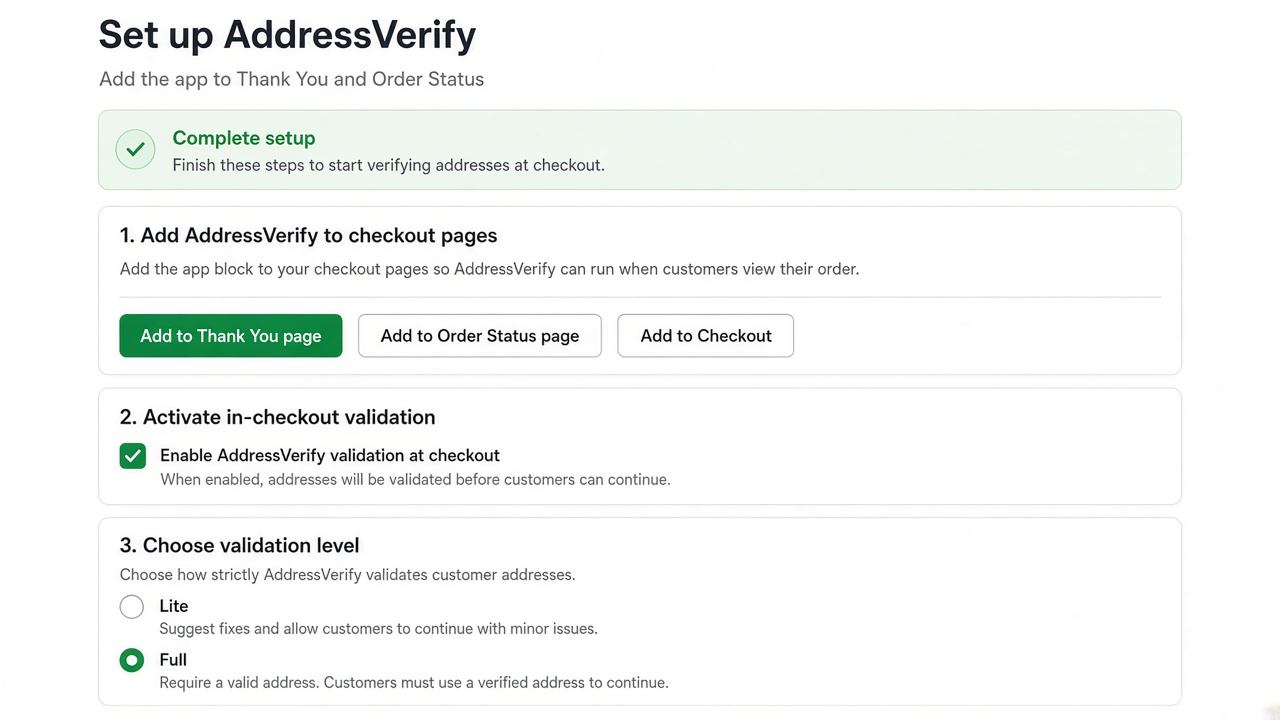
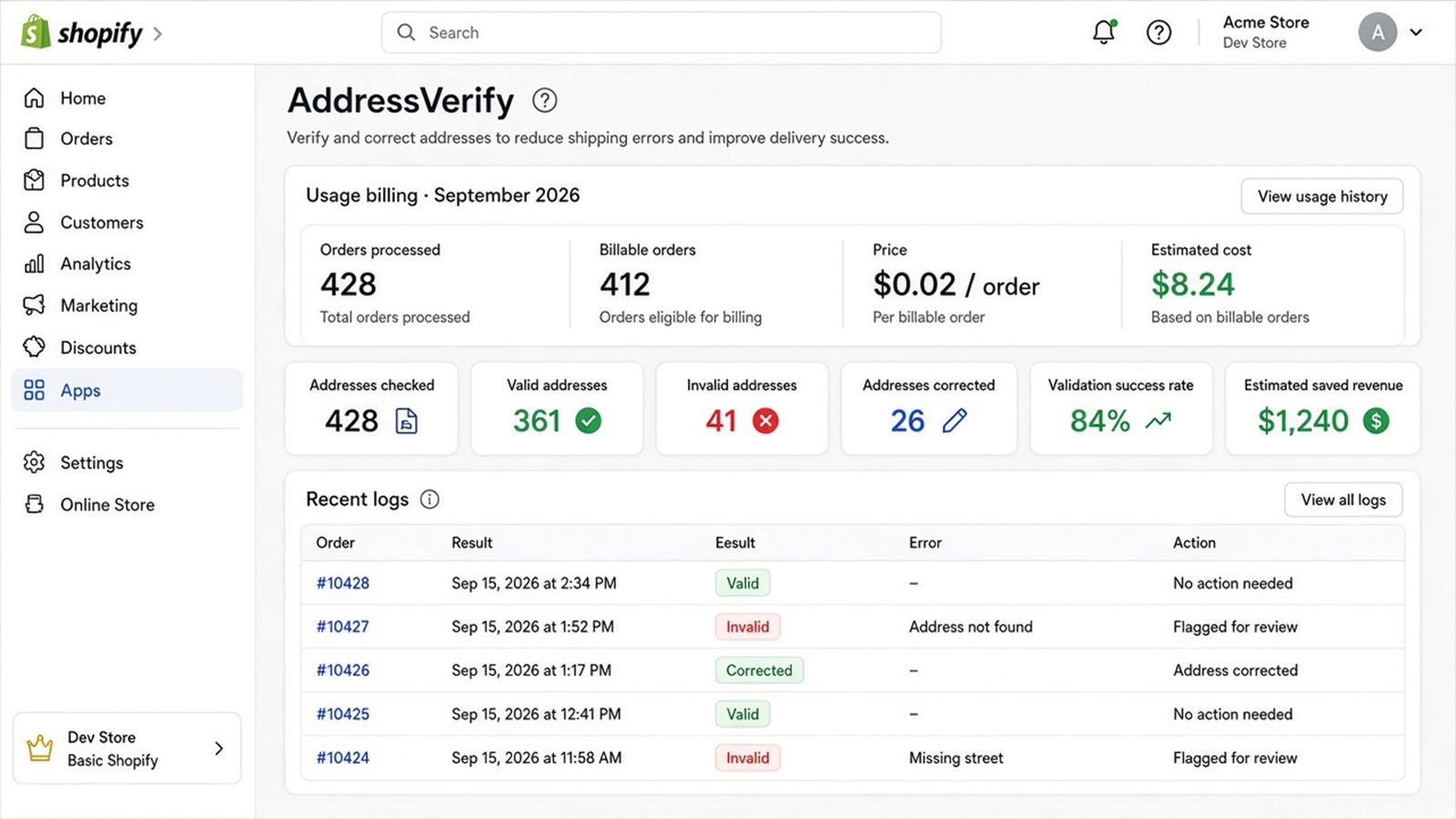
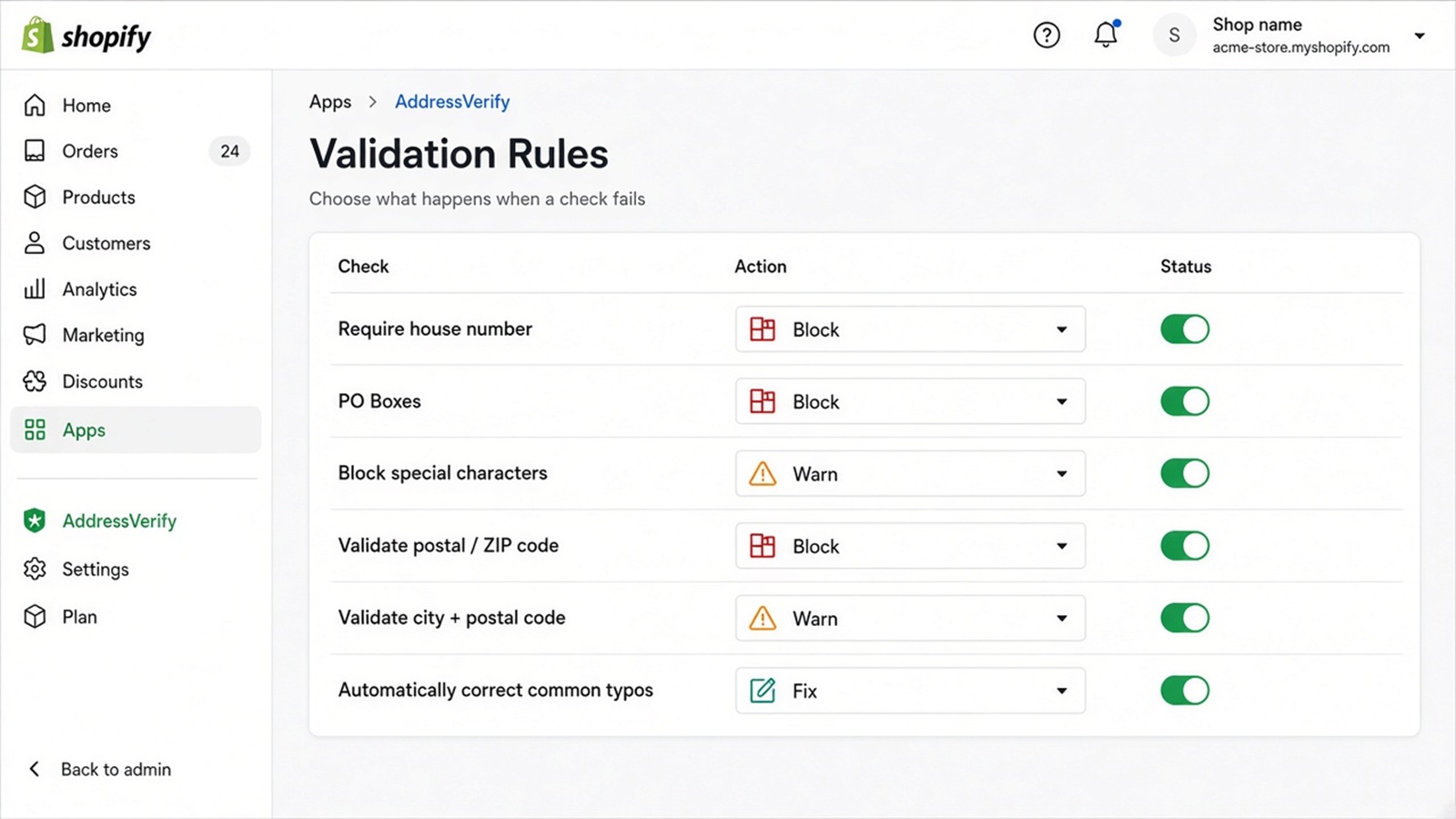
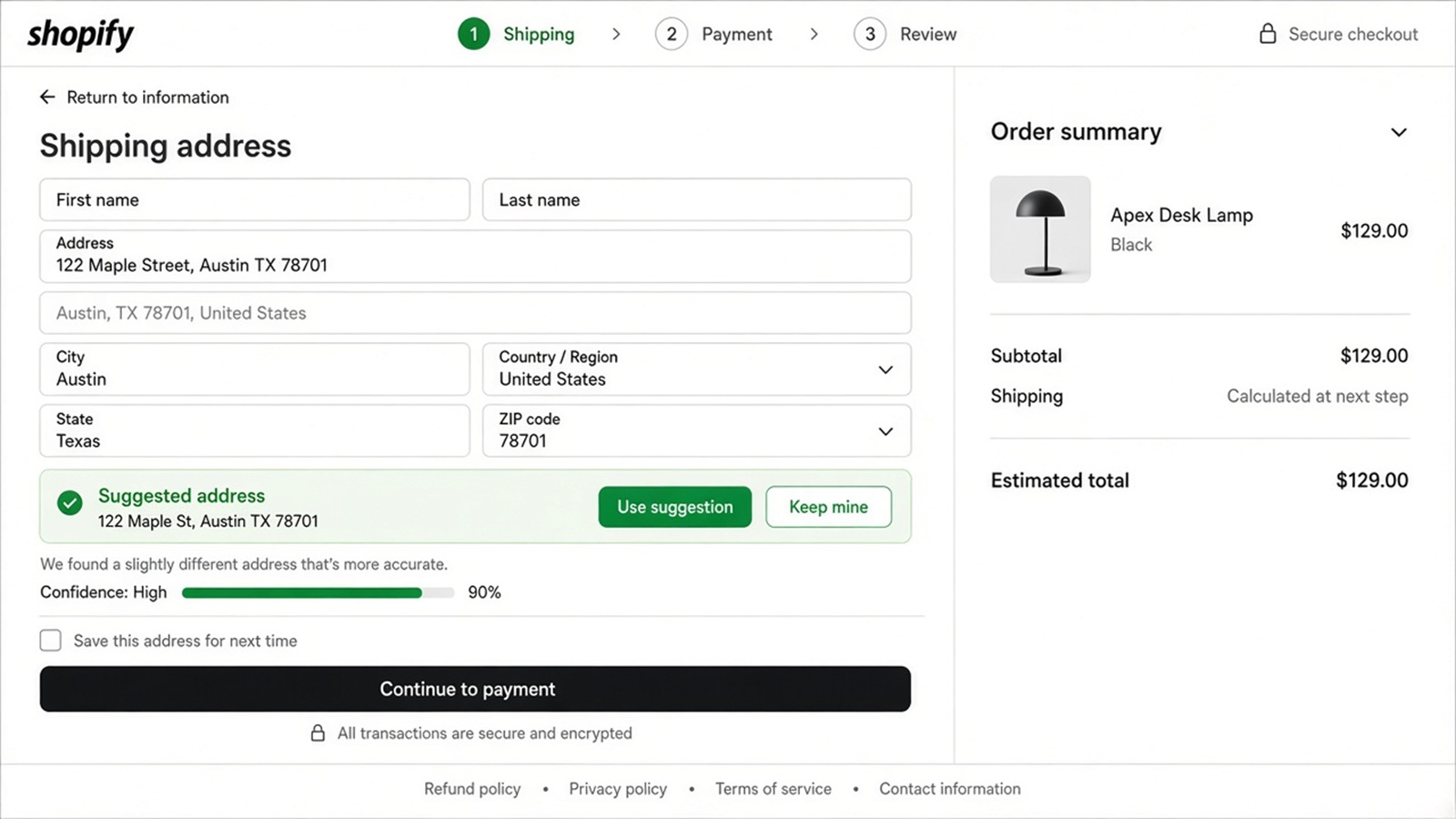
These screens match the live AddressVerify admin and the customer checkout suggestion. Use them as a map while you set the app up.
Setup
Add the block to Thank You and Order Status, optionally Checkout, then choose Lite or Full and save.
Dashboard
Usage for the current period, addresses checked, valid / invalid counts, corrections, and estimated savings.
Validation Rules
Turn each check on or off and set Allow, Warn, Fix, Block, or Review.
Checkout suggestion
Customers can accept a normalized address or keep the one they typed.
Checks
Rules and actions
Lite enables house number, PO Boxes, and special characters. Full enables the complete set below. You can still change the action for each row on Validation Rules.
Check
What it looks for
Default action
Mode
Require house number
Street name with no building number
Block
Lite + Full
PO Boxes (default)
PO Box or packing-station text. Override on PO Box Rules
Block
Lite + Full
Special characters
Characters carriers often reject
Warn
Lite + Full
Postal / ZIP code
Format for the selected country
Block
Full
City + postal
City and postal mismatches or city typos
Warn
Full
Street name
Missing, too-short, or likely invalid streets
Warn
Full
Incomplete address
Missing street, city, postal, or country
Block
Full
Invalid address
Provider cannot verify the address
Review
Full
Correct common typos
Normalize common street and city spelling mistakes
Fix
Full
Allow — do not interrupt checkout.
Warn — show a message and let the customer continue.
Fix — suggest or apply a correction when confidence is high.
Block — stop checkout until the address is fixed.
Review — allow the order, then tag or hold it for your team.
Shopify usage
Usage billing
AddressVerify uses Shopify usage billing. The charge is $0.02 once per unique Shopify order. The Order ID is the idempotency key, so checkout and post-checkout on the same order are not two charges.
Admin Test Address runs are not billed.
Provider or service errors are not billed.
Duplicate processing and cancelled jobs do not add extra charges.
There is no mandatory monthly subscription. Shopify still requires a usage cap; the cap is not a monthly price.
The dashboard and Billing page show processed orders, billable orders, estimated charges, and previous-period history.
After the order
Tags, holds, and Klaviyo
When a result is written, AddressVerify removes the address tags it manages, then writes the current set. Default tags include address_valid, address_fixed, address_invalid, address_missing_house_number, address_po_box, address_special_character, address_typo_corrected, address_unconfirmed, and address_review. You can rename them on Setup.
Order Holds can pause fulfillment for invalid, review, PO Box, or unconfirmed addresses before a label is bought. The hold reason is incorrect address.
Klaviyo is optional. Events include order ID, result, error type, correction status, country, postal code, and timestamp. Full street lines and emails are not sent.
Checkout messages can be translated for English, French, German, Spanish, and Italian.
Before you go live
Test Address and logs
Use Test Address with a real country and street. It uses the same engine as checkout but does not create a Shopify usage charge. Then place a test order and confirm the block on Thank You and Order Status.
Validation Logs show the error type, action taken, whether a correction was applied, and whether the order was held. Analytics rolls those results into error rate, auto-fixes, estimated saved revenue, and ROI.
Help
If something looks wrong
Confirm you clicked Save settings. Nothing is live until you save.
Confirm the AddressVerify block is on Thank You and Order Status, and on Checkout if you want in-checkout suggestions.
If checkout was not blocked, check whether the rule action is Allow, Warn, or Review.
If a provider is down, AddressVerify fails over. Checkout is not blocked unless Fail closed is on.
Email support@addressverify.app with the shop domain, order name, and the validation log time. Do not send customer emails or phones unless they are required to reproduce the issue.